

 English
 Spanish
 Russian
 Chinese
 French
 Hindi
Hindi
 Arabic
 Bengali
 Indonesian
 Portuguese


CAPTCHAs, while effective against bots, can unintentionally exclude people with disabilities, technical limitations, making web access less equitable.
ReCAPTCHA v2 invisible:
Invisible reCAPTCHA v2 is a version of Google’s reCAPTCHA that helps websites distinguish humans from bots without always showing the traditional “I’m not a robot” checkbox.
Key characteristics:
- No visible checkbox by default unlike standard reCAPTCHA v2.
- Displays a small reCAPTCHA badge on the page indicating protection by Google.
Why people may want to bypass it:
- Accessibility challenges
- Some users with visual, cognitive, or motor impairments may find CAPTCHA challenges difficult to complete. Although it is designed to reduce user interaction, it can still create accessibility challenges in some situations.
- Automated testing
- Developers testing websites or applications often need to automate form submissions and may want to avoid CAPTCHA interruptions in test environments.
- Internal business automation
- Organizations may automate workflows (such as processing forms or syncing data) on systems they own and need a way to avoid triggering anti-bot checks.
- False positives
- Legitimate users may repeatedly receive challenges because they use VPNs, privacy tools, unusual network configurations, or shared IP addresses.
We encourage our users to always use Death By Captcha ethically.
Why Node.js?
Node.js was selected for the examples in this guide due to its accessibility, ease of setup, and widespread adoption within the developer community. The examples presented throughout this documentation are intended to be easy to understand, quick to implement, and readily adaptable to other programming languages if required.
Typical Integration Flow
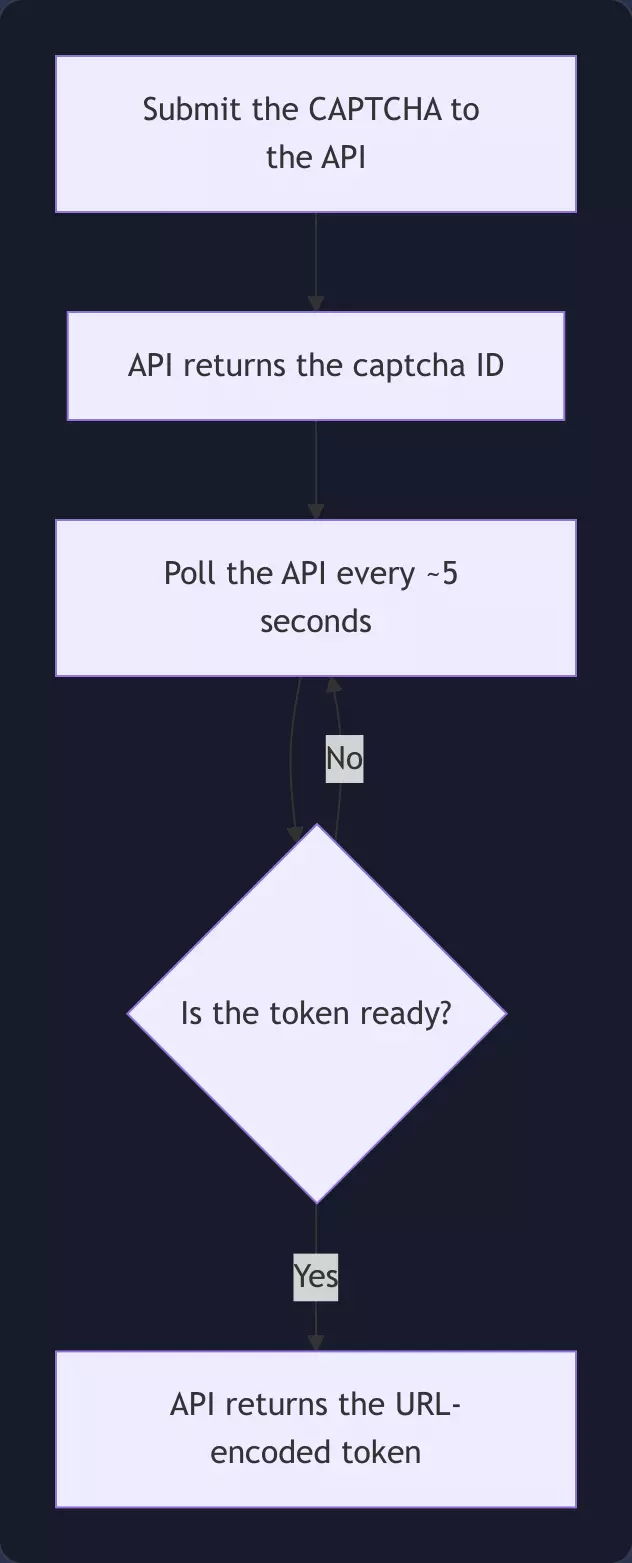
1. Make request to solve the captcha. 2. API returns the captcha ID. 3. Poll API with the captcha ID every ~5 seconds for the token. 4. API returns an object (URL encoded) with the token.
The flow, including the polling loop, looks like this:
Security Considerations
DBC uses the username and password for API authentication. However, you can use authtoken (2FA) as well if preferred rather than the username and password combination.
Environment setup
Creating the app:
Run npm init -y in the folder where your project will live or npm init if you desire to add additional information about the project, just make sure to have index.js as your app entry point and module as your type.
And since we are touching on this matter, we can as well add the run script to the package.json:
"scripts": {
"start": "node index.js"
}
Setting up .env:
a) Required lib:
Install dotenv in your project.
npm install dotenv
b) Create .env file:
Create your .env file to protect your secrets. In this guide we will store authentication/proxy values only in .env.
Note: With Death By Captcha you can either use username and password to authenticate or authtoken, NOT BOTH.
# ---------------------
# DBC AUTHENTICATION
# ---------------------
DBC\_USERNAME=your\_username
DBC\_PASSWORD=your\_password
# DBC\_AUTHTOKEN=your\_authtoken
# ---------------------
# PROXY
# ---------------------
PROXY\_URL=http://user:[email protected]:3128
c) Create index.js file:
Create your index.js file and initiate `dotenv.
import dotenv from "dotenv";
dotenv.config();
The implementation logic
We will keep all the code in index.js for simplicity purposes.
Stage 1: Set up request/payload data
Here we define and initialize the necessary variables for the fetch operation.
const API\_URL = "http://api.dbcapi.me/api/captcha";
const CAPTCHA\_PARAMS = {
proxy: "process.env.PROXY\_URL", // leave empty if no proxy
proxytype: "HTTP", // leave empty if no proxy
googlekey: "6LcmDCcUAAAAAL5QmnMvDFnfPTP4iCUYRk2MwC0-",
pageurl: "https://recaptcha-demo.appspot.com/recaptcha-v2-invisible.php",
};
const TYPE = 4;
Stage 2: Submit captcha to DBC
The function submitCaptcha() is in charge of making the initial fetch request to get the captcha solved and retrieve the captcha ID which will be required on the next step to poll the token. Here we append all parameters (including the credentials stored in the .env file) to the formData object which will be used as the body of the request. If the operation succeeds then we extract the ID from the API returned response and finally return it.
const submitCaptcha = async () => {
const formData = new FormData();
formData.append("username", process.env.DBC\_USERNAME);
formData.append("password", process.env.DBC\_PASSWORD);
// formData.append("authtoken", process.env.DBC\_AUTHTOKEN);
formData.append("type", TYPE);
formData.append("token\_params", JSON.stringify(CAPTCHA\_PARAMS));
const response = await fetch(API\_URL, {
method: "POST",
body: formData,
});
if (!response.ok) {
throw new Error(`Submit failed: ${response.status}`);
}
const text = await response.text();
const params = new URLSearchParams(text);
return params.get("captcha");
};
Stage 3: Fetch for the token
Since Death By Captcha API needs a few seconds to solve the captcha we need to hit the API more than once.
Here we introduce two helpers, the first one is a helper function which will request the response which contains the token:
const getToken = async (captchaId) => {
const response = await fetch(`${API\_URL}/${captchaId}`);
if (!response.ok) {
throw new Error(`Fetch failed: ${response.status}`);
}
return await response.text();
};
And second a delay variable which you can later reuse in your own implementation if you need to delay something:
const delay = (ms) => new Promise((resolve) => setTimeout(resolve, ms));
Stage 4: Orchestrate captcha solution
The function solveCaptcha() is in charge of orchestrating the whole solution, calling submitCaptcha() and getToken(), we submit the captcha once and attempt to get the token every 5 seconds until the final response is received, then we proceed to extract the token and console log it.
const solveCaptcha = async () => {
try {
console.log("Submitting captcha...");
const captchaId = await submitCaptcha();
console.log("Solving captcha...");
console.log("Captcha ID:", captchaId);
const maxAttempts = 24; // 120 seconds timeout
for (let attempt = 1; attempt <= maxAttempts; attempt++) {
console.log(`Waiting 5 seconds before attempt ${attempt}...`);
await delay(5000);
console.log(`Checking result... Attempt ${attempt}`);
const result = await getToken(captchaId);
const params = new URLSearchParams(result);
const token = params.get("text");
if (token.length > 1) return console.log("Final response:", token);
else if (token === "?") return console.log("Empty response.");
console.log("Result not ready yet.");
}
console.log("Timed out waiting for resolution.");
} catch (error) {
console.log(error);
}
};
Finally call the function:
solveCaptcha();
That’s it, you have successfully solved reCaptcha v2 automatically.
Article complete code:
.env
# ---------------------
# DBC AUTHENTICATION
# ---------------------
DBC\_USERNAME=your\_username
DBC\_PASSWORD=your\_password
# DBC\_AUTHTOKEN=your\_authtoken
# ---------------------
# PROXY
# ---------------------
PROXY\_URL=http://user:[email protected]:3128
.index.js
import dotenv from "dotenv";
dotenv.config();
const USERNAME = process.env.DBC\_USERNAME;
const PASSWORD = process.env.DBC\_PASSWORD;
const API\_URL = "http://api.dbcapi.me/api/captcha";
const CAPTCHA\_PARAMS = {
proxy: "process.env.PROXY\_URL", // leave empty if no proxy
proxytype: "HTTP", // leave empty if no proxy
googlekey: "6LcmDCcUAAAAAL5QmnMvDFnfPTP4iCUYRk2MwC0-",
pageurl: "https://recaptcha-demo.appspot.com/recaptcha-v2-invisible.php",
};
const TYPE = 4;
const submitCaptcha = async () => {
const formData = new FormData();
formData.append("username", USERNAME);
formData.append("password", PASSWORD);
formData.append("type", TYPE);
formData.append("token\_params", JSON.stringify(CAPTCHA\_PARAMS));
const response = await fetch(API\_URL, {
method: "POST",
body: formData,
});
if (!response.ok) {
throw new Error(`Submit failed: ${response.status}`);
}
const text = await response.text();
const params = new URLSearchParams(text);
return params.get("captcha");
};
const getToken = async (captchaId) => {
const response = await fetch(`${API\_URL}/${captchaId}`);
if (!response.ok) {
throw new Error(`Fetch failed: ${response.status}`);
}
return await response.text();
};
// Sleep helper
const delay = (ms) => new Promise((resolve) => setTimeout(resolve, ms));
const solveCaptcha = async () => {
try {
console.log("Submitting captcha...");
const captchaId = await submitCaptcha();
console.log("Solving captcha...");
console.log("Captcha ID:", captchaId);
const maxAttempts = 24; // 120 seconds timeout
for (let attempt = 1; attempt <= maxAttempts; attempt++) {
console.log(`Waiting 5 seconds before attempt ${attempt}...`);
await delay(5000);
console.log(`Checking result... Attempt ${attempt}`);
const result = await getToken(captchaId);
const params = new URLSearchParams(result);
const token = params.get("text");
if (token.length > 1) return console.log("Final response:", token);
else if (token === "?") return console.log("Empty response.");
console.log("Result not ready yet.");
}
console.log("Timed out waiting for resolution.");
} catch (error) {
console.log(error);
}
};
solveCaptcha();



 com,
com, 